Custom Storage Backend Plugin Guide
This guide shows you how to implement custom storage backends for Briefcase AI, enabling you to integrate any database or storage system.
Overview
Briefcase AI uses a plugin architecture for storage backends. You can:
- Implement custom backends without modifying core code
- Use any database or storage system (SQL, NoSQL, cloud storage, etc.)
- Package and distribute backends as separate crates/packages
- Load backends dynamically at runtime
Architecture
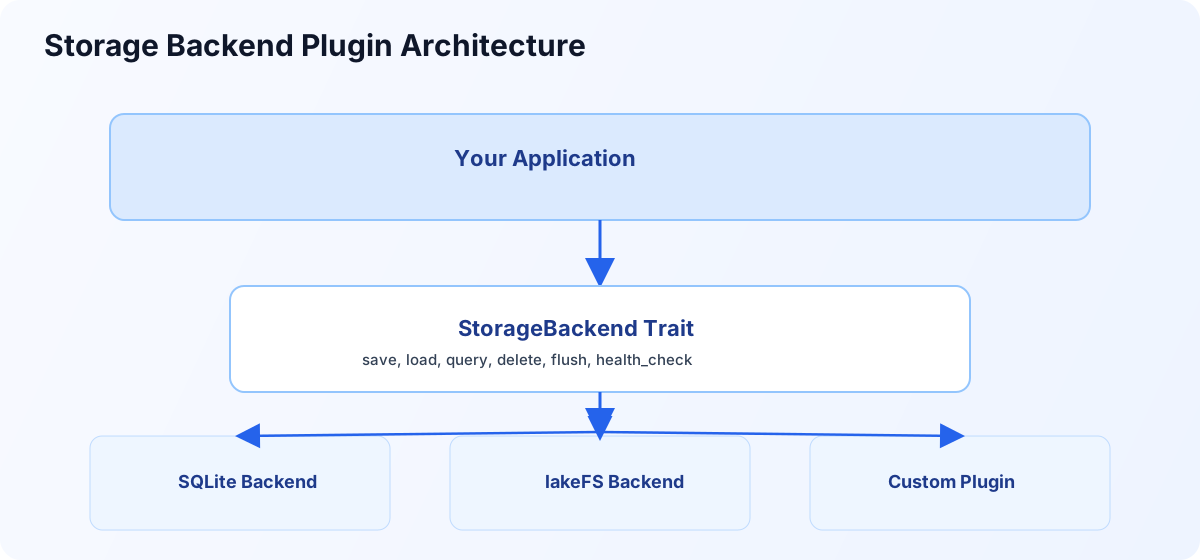
Applications target one StorageBackend interface while selecting SQLite, lakeFS, or custom backend implementations.
Step 1: Implement the StorageBackend Trait
Trait Definition
use async_trait::async_trait;
use briefcase_core::storage::{StorageBackend, StorageError, SnapshotQuery, FlushResult};
use briefcase_core::models::{Snapshot, DecisionSnapshot};

#[async_trait]
pub trait StorageBackend: Send + Sync {
    /// Save a snapshot, return its ID
    async fn save(&self, snapshot: &Snapshot) -> Result<String, StorageError>;

    /// Save a single decision snapshot
    async fn save_decision(&self, decision: &DecisionSnapshot) -> Result<String, StorageError>;

    /// Load a snapshot by ID
    async fn load(&self, snapshot_id: &str) -> Result<Snapshot, StorageError>;

    /// Load a decision by ID
    async fn load_decision(&self, decision_id: &str) -> Result<DecisionSnapshot, StorageError>;

    /// Query snapshots with filters
    async fn query(&self, query: SnapshotQuery) -> Result<Vec<Snapshot>, StorageError>;

    /// Delete a snapshot
    async fn delete(&self, snapshot_id: &str) -> Result<bool, StorageError>;

    /// Flush pending writes (for batching backends)
    async fn flush(&self) -> Result<FlushResult, StorageError>;

    /// Check health/connectivity
    async fn health_check(&self) -> Result<bool, StorageError>;
}
Synchronous Alternative
For synchronous backends (simpler, no async/await):
use briefcase_core::storage::sync::SyncStorageBackend;

pub trait SyncStorageBackend: Send + Sync {
    fn save(&self, snapshot: &Snapshot) -> Result<String, StorageError>;
    fn save_decision(&self, decision: &DecisionSnapshot) -> Result<String, StorageError>;
    fn load(&self, snapshot_id: &str) -> Result<Snapshot, StorageError>;
    fn load_decision(&self, decision_id: &str) -> Result<DecisionSnapshot, StorageError>;
    fn query(&self, query: SnapshotQuery) -> Result<Vec<Snapshot>, StorageError>;
    fn delete(&self, snapshot_id: &str) -> Result<bool, StorageError>;
    fn flush(&self) -> Result<FlushResult, StorageError>;
    fn health_check(&self) -> Result<bool, StorageError>;
}
Step 2: Create Your Backend Implementation
Project Structure
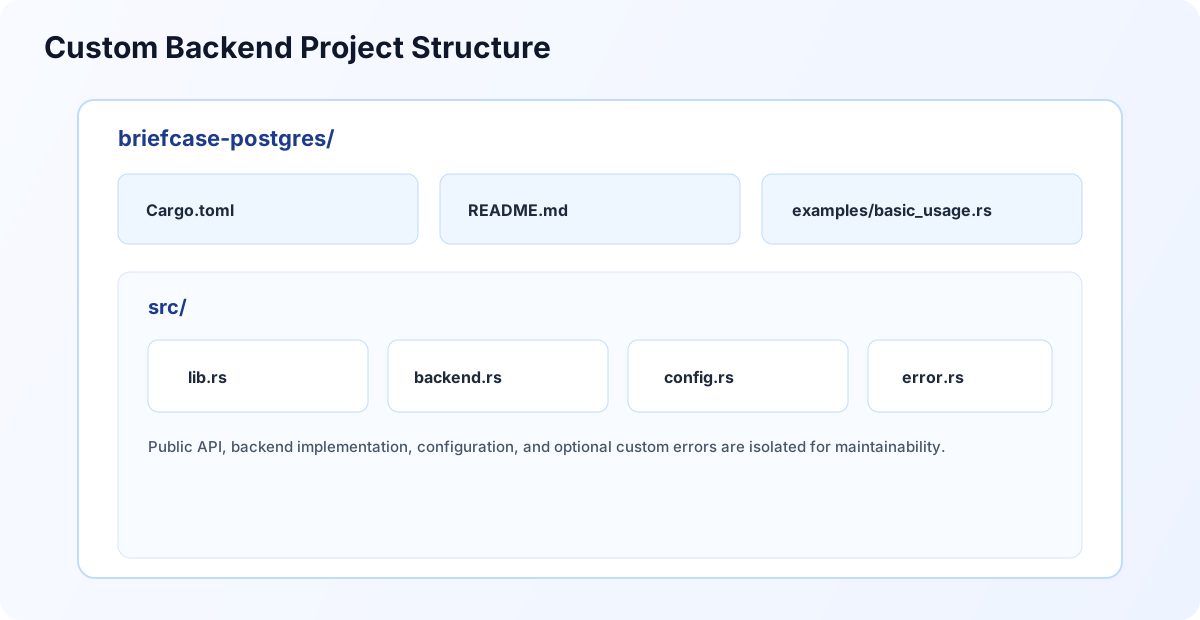
Recommended layout for packaging a custom storage backend as an independent plugin crate.
Suggested files:
| Path | Purpose |
|---|---|
Cargo.toml | crate metadata and dependencies |
README.md | install and usage documentation |
src/lib.rs | public exports |
src/backend.rs | StorageBackend implementation |
src/config.rs | runtime configuration loading |
src/error.rs | optional backend-specific errors |
examples/basic_usage.rs | integration example |
Example: PostgreSQL/JDBC Backend
// src/backend.rs
use async_trait::async_trait;
use briefcase_core::storage::{StorageBackend, StorageError, SnapshotQuery, FlushResult};
use briefcase_core::models::{Snapshot, DecisionSnapshot};
use serde_json;
use std::sync::Arc;
pub struct PostgresBackend {
pool: Arc<Pool<PostgresConnectionManager>>,
config: PostgresConfig,
}
#[derive(Clone)]
pub struct PostgresConfig {
pub connection_string: String,
pub database: String,
pub table: String,
pub timeout_seconds: u64,
}
impl PostgresBackend {
/// Create a new PostgreSQL backend
pub async fn new(config: PostgresConfig) -> Result<Self, StorageError> {
// Connect to PostgreSQL
let manager = PostgresConnectionManager::new(&config.connection_string)
.await
.map_err(|e| StorageError::ConnectionError(e.to_string()))?;
let backend = Self {
client: Arc::new(client),
config,
};
// Initialize schema if needed
backend.initialize_schema().await?;
Ok(backend)
}
async fn initialize_schema(&self) -> Result<(), StorageError> {
// Create table if not exists
let create_table = format!(
r#"
CREATE TABLE IF NOT EXISTS {}.{} (
id VARCHAR(255) PRIMARY KEY,
snapshot_type VARCHAR(50) NOT NULL,
data_json TEXT NOT NULL,
created_at TIMESTAMP NOT NULL DEFAULT CURRENT_TIMESTAMP,
function_name VARCHAR(255),
module_name VARCHAR(255),
INDEX idx_created_at (created_at),
INDEX idx_function (function_name)
)
"#,
self.config.database, self.config.table
);
self.client.execute(&create_table, &[])
.await
.map_err(|e| StorageError::IoError(e.to_string()))?;
Ok(())
}
}
#[async_trait]
impl StorageBackend for PostgresBackend {
async fn save(&self, snapshot: &Snapshot) -> Result<String, StorageError> {
let json = serde_json::to_string(snapshot)
.map_err(|e| StorageError::SerializationError(e.to_string()))?;
let id = snapshot.id.clone();
let insert_sql = format!(
"INSERT INTO {}.{} (id, snapshot_type, data_json, function_name) VALUES (?, ?, ?, ?)",
self.config.database, self.config.table
);
self.client.execute(
&insert_sql,
&[
&id,
&format!("{:?}", snapshot.snapshot_type),
&json,
&snapshot.decisions.first().map(|d| d.function_name.as_str()).unwrap_or("")
]
)
.await
.map_err(|e| StorageError::IoError(e.to_string()))?;
Ok(id)
}
async fn save_decision(&self, decision: &DecisionSnapshot) -> Result<String, StorageError> {
// Convert DecisionSnapshot to Snapshot
let snapshot = Snapshot {
id: uuid::Uuid::new_v4().to_string(),
snapshot_type: briefcase_core::models::SnapshotType::Decision,
decisions: vec![decision.clone()],
created_at: chrono::Utc::now(),
created_by: None,
checksum: None,
};
self.save(&snapshot).await
}
async fn load(&self, snapshot_id: &str) -> Result<Snapshot, StorageError> {
let select_sql = format!(
"SELECT data_json FROM {}.{} WHERE id = ?",
self.config.database, self.config.table
);
let result = self.client.query_one(&select_sql, &[&snapshot_id])
.await
.map_err(|e| StorageError::NotFound(format!("Snapshot {} not found: {}", snapshot_id, e)))?;
serde_json::from_str(&result.data_json)
.map_err(|e| StorageError::SerializationError(e.to_string()))
}
async fn load_decision(&self, decision_id: &str) -> Result<DecisionSnapshot, StorageError> {
let snapshot = self.load(decision_id).await?;
snapshot.decisions.first()
.cloned()
.ok_or_else(|| StorageError::NotFound(format!("Decision {} not found", decision_id)))
}
async fn query(&self, query: SnapshotQuery) -> Result<Vec<Snapshot>, StorageError> {
let mut where_clauses = Vec::new();
let mut params: Vec<&dyn rusqlite::ToSql> = Vec::new();
// Build WHERE clause from query
if let Some(ref function_name) = query.function_name {
where_clauses.push("function_name = ?".to_string());
params.push(function_name);
}
if let Some(ref start_time) = query.start_time {
where_clauses.push("created_at >= ?".to_string());
params.push(start_time);
}
if let Some(ref end_time) = query.end_time {
where_clauses.push("created_at <= ?".to_string());
params.push(end_time);
}
let where_sql = if where_clauses.is_empty() {
String::new()
} else {
format!("WHERE {}", where_clauses.join(" AND "))
};
let limit = query.limit.unwrap_or(100);
let offset = query.offset.unwrap_or(0);
let select_sql = format!(
"SELECT data_json FROM {}.{} {} ORDER BY created_at DESC LIMIT {} OFFSET {}",
self.config.database, self.config.table, where_sql, limit, offset
);
let results = self.client.query(&select_sql, ¶ms)
.await
.map_err(|e| StorageError::IoError(e.to_string()))?;
results.into_iter()
.map(|row| serde_json::from_str(&row.data_json)
.map_err(|e| StorageError::SerializationError(e.to_string())))
.collect()
}
async fn delete(&self, snapshot_id: &str) -> Result<bool, StorageError> {
let delete_sql = format!(
"DELETE FROM {}.{} WHERE id = ?",
self.config.database, self.config.table
);
let rows_affected = self.client.execute(&delete_sql, &[&snapshot_id])
.await
.map_err(|e| StorageError::IoError(e.to_string()))?;
Ok(rows_affected > 0)
}
async fn flush(&self) -> Result<FlushResult, StorageError> {
// PostgreSQL handles writes immediately, so nothing to flush
// For backends with write buffering, implement batch write here
Ok(FlushResult {
snapshots_written: 0,
bytes_written: 0,
checkpoint_id: None,
})
}
async fn health_check(&self) -> Result<bool, StorageError> {
self.client.ping()
.await
.map(|_| true)
.map_err(|e| StorageError::ConnectionError(e.to_string()))
}
}
Step 3: Create Configuration Interface
// src/config.rs

use serde::{Deserialize, Serialize};

#[derive(Debug, Clone, Serialize, Deserialize)]
pub struct PostgresConfig {
    /// Connection string (e.g., "postgresql://host:port/database")
    pub connection_string: String,

    /// Database name
    pub database: String,

    /// Table name for snapshots
    #[serde(default = "default_table")]
    pub table: String,

    /// Connection timeout in seconds
    #[serde(default = "default_timeout")]
    pub timeout_seconds: u64,

    /// Maximum number of connections in pool
    #[serde(default = "default_pool_size")]
    pub pool_size: usize,
}

fn default_table() -> String {
    "briefcase_snapshots".to_string()
}

fn default_timeout() -> u64 {
    30
}

fn default_pool_size() -> usize {
    10
}

impl PostgresConfig {
    /// Create from environment variables
    pub fn from_env() -> Result<Self, ConfigError> {
        Ok(Self {
            connection_string: std::env::var("POSTGRES_CONNECTION")?,
            database: std::env::var("POSTGRES_DATABASE")?,
            table: std::env::var("POSTGRES_TABLE")
                .unwrap_or_else(|_| default_table()),
            timeout_seconds: std::env::var("POSTGRES_TIMEOUT")
                .ok()
                .and_then(|s| s.parse().ok())
                .unwrap_or_else(default_timeout),
            pool_size: std::env::var("POSTGRES_POOL_SIZE")
                .ok()
                .and_then(|s| s.parse().ok())
                .unwrap_or_else(default_pool_size),
        })
    }
}
Step 4: Package as Plugin
Cargo.toml
[package]
name = "briefcase-postgres"
version = "0.1.0"
edition = "2021"
description = "PostgreSQL/JDBC storage backend plugin for Briefcase AI"
license = "MIT"

[lib]
crate-type = ["cdylib", "rlib"]  # Support both dynamic and static linking

[dependencies]
briefcase-core = "2.1"
async-trait = "0.1"
tokio = { version = "1", features = ["full"] }
serde = { version = "1", features = ["derive"] }
serde_json = "1"
uuid = { version = "1", features = ["v4"] }
chrono = { version = "0.4", features = ["serde"] }
thiserror = "1"

# Your database client
tokio-postgres = "1.0"

[dev-dependencies]
tokio-test = "0.4"
Public API (lib.rs)
// src/lib.rs

mod backend;
mod config;

pub use backend::PostgresBackend;
pub use config::PostgresConfig;

// Re-export core types for convenience
pub use briefcase_core::storage::{StorageBackend, StorageError, SnapshotQuery, FlushResult};
pub use briefcase_core::models::{Snapshot, DecisionSnapshot};

/// Plugin metadata
pub const PLUGIN_NAME: &str = "postgres";
pub const PLUGIN_VERSION: &str = env!("CARGO_PKG_VERSION");

#[cfg(test)]
mod tests {
    use super::*;

    #[tokio::test]
    async fn test_backend_creation() {
        let config = PostgresConfig {
            connection_string: "postgresql://localhost:5432".to_string(),
            database: "test_db".to_string(),
            table: "snapshots".to_string(),
            timeout_seconds: 30,
            pool_size: 5,
        };

        // Test would connect to test database
        // let backend = PostgresBackend::new(config).await.unwrap();
    }
}
Step 5: Usage Examples
Rust Application
// examples/basic_usage.rs

use briefcase_postgres::{PostgresBackend, PostgresConfig};
use briefcase_core::storage::StorageBackend;
use briefcase_core::models::DecisionSnapshot;

#[tokio::main]
async fn main() -> Result<(), Box<dyn std::error::Error>> {
    // Configure from environment
    let config = PostgresConfig::from_env()?;

    // Or configure explicitly
    let config = PostgresConfig {
        connection_string: "postgresql://localhost:5432".to_string(),
        database: "production_db".to_string(),
        table: "ai_decisions".to_string(),
        timeout_seconds: 30,
        pool_size: 10,
    };

    // Create backend
    let storage = PostgresBackend::new(config).await?;

    // Use like any StorageBackend
    let decision = DecisionSnapshot::new("my_ai_function")
        .with_module("my_module");

    let decision_id = storage.save_decision(&decision).await?;
    println!("Saved decision: {}", decision_id);

    // Query decisions
    let query = briefcase_core::storage::SnapshotQuery::new()
        .with_function_name("my_ai_function")
        .with_limit(10);

    let results = storage.query(query).await?;
    println!("Found {} decisions", results.len());

    Ok(())
}
Python Bindings (PyO3)
// src/python.rs (optional)

use pyo3::prelude::*;
use pyo3::exceptions::PyRuntimeError;

#[pyclass]
struct PyPostgresBackend {
    inner: PostgresBackend,
    runtime: tokio::runtime::Runtime,
}

#[pymethods]
impl PyPostgresBackend {
    #[new]
    fn new(connection_string: String, database: String) -> PyResult<Self> {
        let runtime = tokio::runtime::Runtime::new()
            .map_err(|e| PyRuntimeError::new_err(e.to_string()))?;

        let config = PostgresConfig {
            connection_string,
            database,
            table: "briefcase_snapshots".to_string(),
            timeout_seconds: 30,
            pool_size: 10,
        };

        let inner = runtime.block_on(async {
            PostgresBackend::new(config).await
        }).map_err(|e| PyRuntimeError::new_err(e.to_string()))?;

        Ok(Self { inner, runtime })
    }

    fn save_decision(&self, decision_json: &str) -> PyResult<String> {
        // Implement Python wrapper
        todo!()
    }
}

#[pymodule]
fn briefcase_postgres(_py: Python, m: &PyModule) -> PyResult<()> {
    m.add_class::<PyPostgresBackend>()?;
    Ok(())
}
Step 6: Testing
// integration test module

#[cfg(test)]
mod tests {
    use super::*;
    use briefcase_core::models::{Input, Output};

    async fn setup_test_backend() -> PostgresBackend {
        let config = PostgresConfig {
            connection_string: "postgresql://localhost:5432".to_string(),
            database: "test_db".to_string(),
            table: "test_snapshots".to_string(),
            timeout_seconds: 10,
            pool_size: 2,
        };

        PostgresBackend::new(config).await.unwrap()
    }

    #[tokio::test]
    async fn test_save_and_load() {
        let backend = setup_test_backend().await;

        let decision = DecisionSnapshot::new("test_function")
            .add_input(Input::new("query", "test", "string"))
            .add_output(Output::new("response", "result", "string"));

        // Save
        let id = backend.save_decision(&decision).await.unwrap();

        // Load
        let loaded = backend.load_decision(&id).await.unwrap();
        assert_eq!(loaded.function_name, "test_function");
    }

    #[tokio::test]
    async fn test_query_filtering() {
        let backend = setup_test_backend().await;

        // Save test data
        for i in 0..5 {
            let decision = DecisionSnapshot::new(&format!("func_{}", i));
            backend.save_decision(&decision).await.unwrap();
        }

        // Query with filter
        let query = SnapshotQuery::new()
            .with_function_name("func_1")
            .with_limit(10);

        let results = backend.query(query).await.unwrap();
        assert_eq!(results.len(), 1);
    }

    #[tokio::test]
    async fn test_health_check() {
        let backend = setup_test_backend().await;
        assert!(backend.health_check().await.unwrap());
    }
}
Step 7: Create Plugin Documentation
Example Plugin README Template
When publishing your plugin, include comprehensive documentation. Here's a template:
# Briefcase PostgreSQL Storage Backend

PostgreSQL storage backend plugin for Briefcase AI.

## Installation

```toml
[dependencies]
briefcase-postgres = "0.1"
Configuration
Environment Variables
export POSTGRES_CONNECTION="postgresql://localhost:5432"
export POSTGRES_DATABASE="my_database"
export POSTGRES_TABLE="ai_decisions"
export POSTGRES_TIMEOUT="30"
export POSTGRES_POOL_SIZE="10"
Programmatic
use briefcase_postgres::{PostgresBackend, PostgresConfig};

let config = PostgresConfig {
    connection_string: "postgresql://host:port".to_string(),
    database: "my_db".to_string(),
    table: "snapshots".to_string(),
    timeout_seconds: 30,
    pool_size: 10,
};

let storage = PostgresBackend::new(config).await?;
Usage
See complete examples in the repository at examples/.
License
MIT
## Using Custom Storage Backends

Once you've created a storage backend plugin, integrate it into your Briefcase AI application:

### Rust Integration

```rust
use briefcase_postgres::{PostgresBackend, PostgresConfig};
use briefcase_ai::BriefcaseClient;

#[tokio::main]
async fn main() -> Result<(), Box<dyn std::error::Error>> {
    // Configure your custom backend
    let storage_config = PostgresConfig::from_env()?;
    let storage = PostgresBackend::new(storage_config).await?;

    // Use with Briefcase AI
    let client = BriefcaseClient::with_storage(Box::new(storage)).await?;

    // Your AI decisions now use the custom backend
    let decision = briefcase_ai::DecisionSnapshot::new("my_function");
    let decision_id = client.save_decision(&decision).await?;

    Ok(())
}
Python Integration
import briefcase_ai
from briefcase_postgres import PostgresBackend

# Configure custom backend
storage = PostgresBackend(
    connection_string="postgresql://localhost:5432",
    database="ai_decisions"
)

# Initialize Briefcase with custom storage
briefcase_ai.init(storage_backend=storage)

# Use normally
decision = briefcase_ai.DecisionSnapshot("my_function")
decision_id = storage.save_decision(decision)
Dynamic Loading
For applications that need to switch between different backends:
use briefcase_core::storage::StorageBackend;
use std::collections::HashMap;

struct BackendRegistry {
    backends: HashMap<String, Box<dyn StorageBackend>>
}

impl BackendRegistry {
    async fn create_backend(&self, backend_type: &str, config: &str) -> Result<Box<dyn StorageBackend>, Box<dyn std::error::Error>> {
        match backend_type {
            "postgres" => {
                let config: PostgresConfig = serde_json::from_str(config)?;
                Ok(Box::new(PostgresBackend::new(config).await?))
            },
            "sqlite" => {
                Ok(Box::new(briefcase_core::SqliteBackend::new(config)?))
            },
            "lakefs" => {
                let config: LakeFSConfig = serde_json::from_str(config)?;
                Ok(Box::new(briefcase_lakefs::LakeFSBackend::new(config).await?))
            },
            _ => Err(format!("Unknown backend type: {}", backend_type).into())
        }
    }
}
Licensing Considerations
When creating custom storage backends, consider these licensing requirements:
Compatible Licenses
Briefcase AI core uses the Apache 2.0 license. Your custom backend can use:
- Apache 2.0 - Fully compatible, recommended
- MIT - Compatible for most use cases
- BSD (2-clause or 3-clause) - Compatible
- ISC - Compatible
Avoid These Licenses
- GPL v2/v3 - May require your application to be GPL licensed
- AGPL - Network use triggers license obligations
- SSPL - Service provider restrictions
- Commercial-only - May not be redistributable
Database Driver Licenses
Pay attention to your database client library licenses:
| Database | Popular Client | License | Compatibility |
|---|---|---|---|
| PostgreSQL | tokio-postgres | MIT | ✅ Compatible |
| MySQL | sqlx | Apache 2.0 | ✅ Compatible |
| MongoDB | mongodb | Apache 2.0 | ✅ Compatible |
| Redis | redis-rs | BSD-3-Clause | ✅ Compatible |
| Oracle | Official drivers | Commercial | ⚠️ Check terms |
License Declaration
Always declare your backend's license clearly:
# Cargo.toml
[package]
name = "briefcase-custom-backend"
license = "Apache-2.0"
license-file = "LICENSE"  # Include full license text

# For dual licensing
license = "MIT OR Apache-2.0"
Corporate Considerations
For enterprise backends:
- Internal Use: License restrictions are minimal for internal tooling
- Customer Distribution: Ensure licenses allow redistribution to clients
- SaaS Deployment: Some licenses (AGPL) have network use clauses
- Vendor Dependencies: Review all transitive dependency licenses
lakeFS Cloud Compatibility Notes
If you are building a backend that writes to lakeFS Cloud (managed lakeFS), be aware of two behaviors that differ from self-hosted lakeFS:
Presigned Staging Upload (mandatory)
lakeFS Cloud rejects direct PUT uploads with Content-Type: application/octet-stream or multipart/form-data. All object writes must use the presigned staging flow:
GET /repositories/{repo}/branches/{branch}/staging/backing?path=...&presign=true— returns{ "physical_address": "s3://...", "presigned_url": "https://s3.amazonaws.com/..." }PUT {presigned_url}— upload directly to S3 (no Authorization header, no lakeFS credentials)PUT /repositories/{repo}/branches/{branch}/objects?path=...with JSON body{ "physical_address": "...", "checksum": "<etag>", "size_bytes": <n> }— link the staged object
Note: lakeFS Cloud returns the presigned URL as a flat presigned_url field. Some documentation and older SDK versions expect presign_info.url—that path does not apply to lakeFS Cloud.
List Response Field Name
lakeFS Cloud returns path_type in list object responses. Self-hosted lakeFS returns type. When deserializing list results, accept both:
#[derive(Deserialize)]
struct ObjectInfo {
    path: String,
    // lakeFS Cloud uses "path_type"; self-hosted lakeFS uses "type".
    #[serde(rename = "type", alias = "path_type")]
    object_type: String,
}
DELETE Idempotency
lakeFS DELETE /objects is idempotent and always returns 204 regardless of whether the object existed. If your delete() implementation needs to return false for nonexistent objects (as StorageBackend specifies), stat the object first (GET /refs/{branch}/objects/stat?path=...) and only call DELETE if the stat succeeds.
Best Practices
1. Error Handling
Always map database errors to appropriate StorageError variants:
.map_err(|e| match e.kind() {
    ErrorKind::NotFound => StorageError::NotFound(e.to_string()),
    ErrorKind::PermissionDenied => StorageError::PermissionDenied(e.to_string()),
    ErrorKind::Timeout => StorageError::ConnectionError("Timeout".to_string()),
    _ => StorageError::IoError(e.to_string()),
})
2. Connection Pooling
Use connection pools for better performance:
use deadpool::managed::Pool;

pub struct PostgresBackend {
    pool: Pool<PostgresConnectionManager>,
}
3. Batch Operations
Implement efficient batching in flush():
async fn flush(&self) -> Result<FlushResult, StorageError> {
    let pending = self.buffer.lock().await;
    let count = pending.len();

    // Batch insert
    self.client.batch_insert(&pending).await?;

    Ok(FlushResult {
        snapshots_written: count,
        bytes_written: estimate_size(&pending),
        checkpoint_id: Some(generate_checkpoint_id()),
    })
}
4. Schema Migrations
Version your schema and handle migrations:
async fn initialize_schema(&self) -> Result<(), StorageError> {
    let version = self.get_schema_version().await?;

    match version {
        None => self.create_schema_v1().await?,
        Some(1) => self.migrate_v1_to_v2().await?,
        Some(2) => { /* current version */ }
        _ => return Err(StorageError::InvalidQuery("Unknown schema version".into())),
    }

    Ok(())
}
Distribution
Publish to crates.io
cargo publish
Python Wheel
maturin build --release
maturin publish
NPM Package (WASM)
wasm-pack build --target nodejs
npm publish
Summary
You now have a complete plugin system for custom storage backends:
- Implement
StorageBackendorSyncStorageBackendtrait - Package as separate crate with feature flags
- Provide configuration via environment or struct
- Export public API for easy integration
- Add comprehensive tests
- Document usage and examples
- Publish to package registries
Users can now bring their own storage backend by simply implementing 8 methods!